We Generated AI Headshots for 9 Professions — Here's What We Learned
We tested all 9 kaptura.ai headshot styles — Corporate, Executive, Doctor, Lawyer, Government, Startup, Business, Casual, and Realtor — and documented exactly what each one produces.
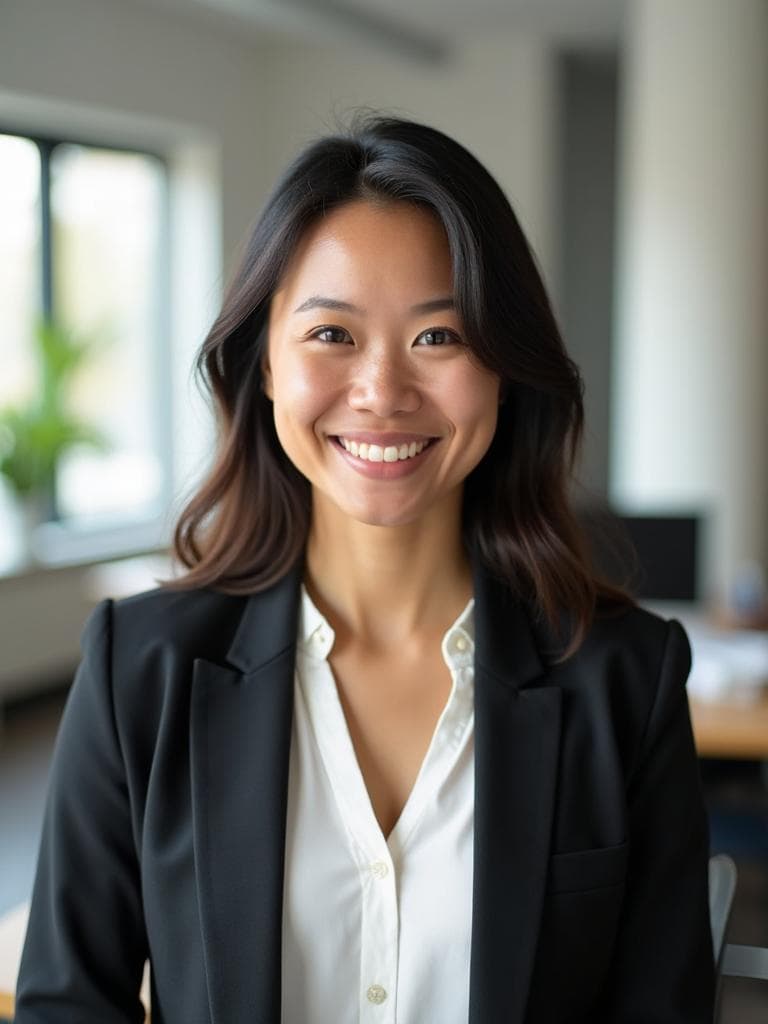


Examples generated with Kaptura AI · Results vary by input photos
Catalogue update — September 2026: Corporate has been retired from new purchases. Business is the general professional option, and Creative adds bold-color studio portraits. The comparison below describes the earlier catalogue; Creative is not part of its historical examples.
We built kaptura.ai with nine profession-specific style packs. Not nine random filters — nine distinct visual systems, each trained to produce headshots that fit the norms of a specific professional context. Corporate finance doesn't look like real estate. A doctor's directory photo doesn't look like a startup founder's About page.
But we'd never sat down and run all nine styles side by side, on the same set of faces, and just... documented what came out. So we did exactly that. We uploaded photos, generated headshots in every style, and took detailed notes on attire, backgrounds, lighting, posing, and where each result would (and wouldn't) work.
This is what we found.
How We Set This Up
We used kaptura.ai's Professional plan to generate 100 headshots across all nine styles. We uploaded a variety of selfies and casual photos — the kind of images most people actually have on their phones — and let the AI do its work. Each batch delivered in roughly 10 minutes.
No cherry-picking. We're showing you what the styles actually produce, including where they shine and where they have limitations.
The 9 Styles, One by One
1. Corporate
What the AI generates: Dark suit jackets (usually charcoal or navy), neutral-toned dress shirts, muted ties for male-presenting subjects. For female-presenting subjects, structured blazers in dark tones with simple necklines. Backgrounds are consistently soft gradients — light gray to slate blue. Lighting is even and front-facing with minimal shadow.
Designed for: Finance, accounting, consulting, banking, insurance.
Where you'd use it: LinkedIn profiles, company team pages, annual reports, conference speaker bios.
Honest take: If you need a professional headshot and you don't know which style to pick, Corporate is the safest default. It won't wow anyone, but it won't raise eyebrows either.
2. Executive
What the AI generates: Premium suiting — darker fabrics, more refined tailoring than Corporate. Backgrounds shift to deeper tones: dark navy, charcoal, occasionally black. Lighting becomes more dramatic with subtle side-lighting. Poses carry more gravitas — chin slightly elevated, direct eye contact, shoulders squared with authority.
Designed for: C-suite executives, board members, managing partners, senior leadership.
Where you'd use it: Board of directors pages, press kits, keynote speaker profiles, investor decks.
Honest take: The best style for anyone whose headshot will appear alongside a title that starts with "Chief" or "Senior Vice President."
3. Doctor
What the AI generates: White lab coats over professional attire. Backgrounds lean clinical — soft white, light blue, or neutral gray. Lighting is bright and even. Poses are approachable: a slight smile, open posture, occasionally a hint of a stethoscope.
Designed for: Physicians, dentists, veterinarians, clinical researchers.
Where you'd use it: Hospital directories, practice websites, Healthgrades or Zocdoc profiles.
Honest take: If you're a physician and your practice website still has a photo from 2014, this style will produce a replacement that looks current and credible in about 10 minutes.
4. Lawyer
What the AI generates: Dark, authoritative suiting — navy and charcoal, always buttoned. Backgrounds run toward traditional tones: dark wood, deep blue. Lighting is moderately dramatic. Poses project confidence and composure: direct gaze, squared shoulders, measured expressions.
Designed for: Attorneys, partners, legal professionals, judges, compliance officers.
Where you'd use it: Law firm websites, bar association directories, legal publications.
Honest take: Law firm websites are one of the places where headshot quality directly affects whether someone picks up the phone. This style produces shots that belong in that context.
5. Government
What the AI generates: Conservative professional attire — suits in navy, charcoal, and black. Backgrounds are deliberately neutral and institutional: light gray, pale blue. Lighting is flat and even. Poses are formal, centered, and symmetrical.
Designed for: Government officials, military personnel (civilian contexts), public administrators, civil servants.
Where you'd use it: Government agency websites, official directories, campaign materials.
Honest take: If you've ever tried to use a casual photo on an official government bio page, you know how wrong it looks. This style produces exactly the kind of photo those pages require.
6. Startup
What the AI generates: Smart casual attire — crew-neck sweaters, open-collar shirts, occasionally a casual blazer with no tie. Backgrounds are brighter and more modern. Lighting is warm and natural-feeling. Poses are relaxed — a genuine smile, open body language.
Designed for: Startup founders, product managers, tech workers, designers.
Where you'd use it: Startup websites, Product Hunt launches, AngelList profiles, podcast guest bios.
Honest take: If you're building your company's About page and you want the team to look like people you'd actually want to work with, this is the style.
7. Business
What the AI generates: Business professional attire between Corporate and Startup. Blazers with open collars, or button-downs without ties. Backgrounds are clean and neutral. Poses strike a middle ground: engaged and confident, but not overly formal.
Designed for: Mid-level professionals, project managers, HR professionals, educators.
Where you'd use it: LinkedIn, company intranet profiles, conference name badges, webinar bios.
Honest take: This is the style we'd recommend to someone who says "I just need a good professional headshot" without any other context.
8. Casual
What the AI generates: Relaxed, everyday professional clothing — simple tops, light layers, no blazers. Backgrounds are softer and warmer. Lighting is the warmest and most natural of all nine styles. Poses are genuinely relaxed.
Designed for: Freelancers, creative professionals, coaches, therapists, personal brands.
Where you'd use it: Personal websites, social media profiles, coaching platforms, author bios.
Honest take: If your professional brand is built on being a real human (not a suit), Casual delivers that vibe reliably. Just don't use it somewhere that expects formality.
9. Realtor
What the AI generates: Polished, approachable professional attire — structured blazers in warm tones. Backgrounds are notably brighter: warm gradients, light gold or cream tones. Lighting is warm and flattering. Poses are high-energy and personable — big smiles, direct eye contact.
Designed for: Real estate agents, mortgage brokers, property managers.
Where you'd use it: MLS listings, Zillow profiles, real estate business cards, brokerage team pages.
Honest take: If you're a realtor still using a headshot from when you got your license, this style produces MLS-ready results that look current and professional.
All 9 Styles Compared: Side by Side
| Style | Typical Attire | Background | Best For |
|---|---|---|---|
| Corporate | Dark suit, neutral tones | Light gray / soft gradient | Finance, consulting |
| Executive | Premium suiting, dark fabrics | Dark navy / charcoal | C-suite, board members |
| Doctor | White lab coat | Clinical white / light blue | Physicians, dentists |
| Lawyer | Dark authoritative suit | Dark wood / deep blue | Attorneys, legal professionals |
| Government | Conservative suit | Neutral gray / institutional | Officials, civil servants |
| Startup | Smart casual, no tie | Bright white / warm natural | Founders, tech professionals |
| Business | Blazer, open collar | Clean white / light gray | Mid-level professionals |
| Casual | Relaxed everyday attire | Warm pastels / natural | Freelancers, coaches, creators |
| Realtor | Warm-toned blazer | Bright / warm cream / gold | Agents, brokers |
Which Style Should You Pick?
For LinkedIn: Start with Business. If you're in a specific profession with strong visual norms (law, medicine, finance), use that profession's style instead.
For a hospital directory: Doctor, without question.
For a law firm website: Lawyer. The traditional tones match what clients expect.
For an MLS listing: Realtor. Warm, personable, high-energy.
For a startup About page: Startup. Smart-casual and natural warmth.
For government profiles: Government. Neutral, institutional, meets official standards.
For personal brands: Start with Casual. If your brand skews more professional, try Business.
If you genuinely don't know: Try Business first. It's the most versatile style.
Pro tip: Our Premium ($39) and Professional ($49) plans give you enough headshots to try multiple styles and compare.
AI Headshots vs. a $300 Photography Session
For 80% of professionals who need a solid, current headshot for their LinkedIn or company page, AI headshots deliver results that are genuinely good enough — and often better than the outdated or poorly-lit photo they're currently using. For the 20% who need precise creative control, specific environments, or high-end editorial quality, a photographer remains the better choice.
We think both options have a place. In fact, several photographers have told us they recommend kaptura.ai to clients who need a headshot now while booking a full session for later.
Pricing
| Plan | Headshots | Styles | Price |
|---|---|---|---|
| Starter | 20 | All 9 styles | $19 |
| Premium | 50 | All 9 styles | $39 |
| Professional | 100 | All 9 styles | $49 |
Every plan includes HD resolution, a commercial license, and a 3-day money-back guarantee. All nine styles are available on every plan.
Frequently Asked Questions
Can I use the same uploaded photos for different styles?+
How long does it take to receive headshots?+
Which style is best for LinkedIn?+
Are these headshots high enough quality for print?+
What if I don't like the results?+
Do I need professional photos to upload?+
Get Your Professional Headshots
Profession-specific headshots from your selfies. Ready in ~10 minutes.